4:0 / 4:1 / 4:4
Refers to the number of colours used per side (e.g. full colour one side, blank reverse).
Can be referred to as four back zero / four back one / four back four.
Printing and production terminology explained clearly and simply.
Refers to the number of colours used per side (e.g. full colour one side, blank reverse).
Can be referred to as four back zero / four back one / four back four.
See CMYK.
The most common paper sizes used for stationery, leaflets and other publications - See above
A term used for coated papers.
The images/text that are to be printed (usually supplied digitally as a PDF).
As a general rule, artwork refers to images/text that are print ready and should be supplied as a high resolution PDF at 300 dpi (actual Size), with crop marks and 3mm bleed or as a Vector eps/Illustrator(ai) file.
Where the image to be printed extends (usually by 3mm) over the crop marks. This makes trimming easier and means the finished documents will run to the edges
A type of embossing where no ink is used. Instead, the design or text is only visible as a raised area on the paper/card. Also see debossing which has the opposite effect.
Strong, uncoated paper often used for stationery
Paper sizes used for envelopes. These correspond to A-sizes (e.g. C4 envelope will hold A4 sheets)
C3 - 324 x 458 mm C4 - 229 x 324 mm
C5 - 162 x 229 mm C6 - 114 x 162 mm
DL - 110 x 220 mm (holds A4 folded twice)
Abbreviation of Cyan, Magenta, Yellow and Black.
These make up the standard 4 colour process used for printing in full colour.
Paper which has a coating on one or both sides. This can have a gloss or silk (matt) finish. Coated papers are used for the majority of printed products, but not for stationery where an uncoated (or bond) paper is used.
Lines marking where the paper is to be trimmed after printing. These should be part of the artwork
The custom made cutter used when die-cutting.
Where an image is pressed or stamped into the paper creating a depression as opposed to an embossed, raised impression.
Where an irregular shape is cut from the paper instead of trimming square edges. This can be any shape but requires a die or cutting forme to be made up specially.
Low cost method of printing best suited for short run jobs. It works directly from electronic data without the need for printing plates. This makes the process very quick but the print quality, although a good alternative is not on par with lithography. Also, you can not use specific spot colours or metallic inks. Generally good for 500 or less.
Dots per inch, or the image resolution. For print, all images in a document should always be a minimum of 300dpi - see resolution.
A Mock up of the finished product. This can be printed or unprinted, depending on the purpose. See proofs.
Where designs are pressed in to the paper to leave a raised effect.
the most widely used file format for graphics which are to be included in page-layout and text files.
Where a design is stamped into the cover, usually in a metallic foil.
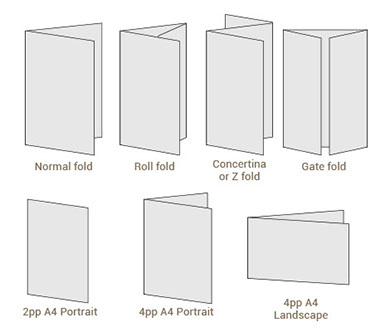
There are a large number of different folding options. Some common folds are:
Printing in CMYK, as opposed to using spot colours. Although you can print full colour with additional spot colours.
Graphic image file format used on the web, may be a static image or a simple animation. Also good for Powerpoint files as they are small and can have transparent backgrounds.
These papers have a smooth surface and a high shine, perfect for producing printed promotional items e.g brochures, flyers and leaflets.
Grams per square metre. This is the standard measurement of weight for paper.
Hex codes are ways of representing colors in a format that can be understood by computers. Mainly used for websites and eshots etc. eg. #3a297c
The pages of the artwork are arranged such that after printing, cutting and folding, the pages will be in the correct order. Sometimes seen when an imposition proof is supplied electronically, the pages will not be in chronological order.
Generally a photographic or tonal image in digital format, viewable on any platform.
Where a thin plastic film is fixed to one or both sides of the paper. This can create a silky matt or a high gloss finish, depending on the intended purpose and personal preference. It also acts as a protective barrier if the print needs to be more durable or is likely to encounter a demanding environment.
Where a document is oriented so the long edges are at the top and bottom. As opposed to portrait.
The most popular print process, a metal plate is treated so that the image area attracts the oil-based inks, while the wet non-image areas resist them.
The files to be printed which make up the artwork. Usually a print ready PDF.
One side of a sheet of paper. For example, an A4 sheet has 2 pages. An A4 sheet folded in half to A5 has 4 pages.
Universal file format which combines images and text. These can be saved as Low Res or High res Print files - See file name above.
Where the text pages are glued in to the cover. See also burst binding.
Pantone Matching System. Followed by 3 or 4 digits to make up a code e.g. PMS 072.
See spot colours
The ideal web graphic file types. They are completely lossless and they support alpha transparency. PNG-8 is essentially a GIF. Also good for Powerpoint files as they are small and can have transparent backgrounds.
Where a document is oriented so the long edges are on either side. As opposed to landscape
Printed pages. Refers to the number of pages in a document e.g. 12pp (12 pages)
Proofs are an example of what is to be printed so both parties are in agreement. Any errors or amendments should be picked up at this stage. This can take the form of a digital proof, usually supplied as a PDF, or a printed proof. See digital proofs and wet proofs for more details.
Photoshop Document extension. A design program used to manipulate raster (bitmap) images.
There are two kinds of digital images. A raster image is made up of individual pixels. When you try to enlarge a raster image it looks pixelated because you are taking each block of information (pixel) and just making it bigger. Raster images are often created in programs like Photoshop and have the extension JPG. TIFF or .GIF. Tiff. PNG.
Resolution is a measure of dots per inch (DPI) for printed works and pixels per inch (PPI) for digital work. If the resolution of an image is too low, your final product will come out looking grainy or pixelated.
Images for litho print should generally be 300 DPI at the size you wish to use the image. If the images are to be printed digitally or for Large format print you can sometimes you can get away with a lower resolution.
72DPI for web work or viewing on screen.
If in doubt talk to your designer.
The oldest method of printing. Ink is applied to a porous silk screen and passes through a stencil or template to leave an impression. Normally used when printing on fabric and banners and when printing on board that is too thick to pass through a standard litho print press.
Where the cover and text pages are on the same paper stock.
Silk papers have a low surface shine, a smooth finish, but not glossy.
Refers to solid colours which are found in commercially obtainable colour ranges such as Pantone®, these are mostly used in addition to CMYK where CMYK is not available e.g. Printing gold or silver. When using Pantone colours, it is worth bearing in mind for future jobs that should you want to print in CMYK, the chosen Pantone® may not have a suitable CMYK equivalent, which may in turn lead to the expense of using additional plates.
A high gloss finish applied to specific areas of print. This differs from gloss laminating which has to cover the whole sheet.
File format used to store large non-compressed image files, generally used for high resolution print.
Paper which has not been coated, not gloss or silk.
A vector image is made up of points connected along a curve (or vector). The image can be expanded to an infinite size. Vector images are created in programs like Illustrator and have the file extension .EPS. AI.
Note EPS’s can also be resolution based Raster images if created/saved in photoshop.